About Autodesk Navisworks Simulate 2022
Autodesk Navisworks Simulate represents the Navisworks 2022 line. Autodesk Navisworks Manage solutions offer tools for designing and optimizing construction schedules, detecting intersections and collisions, collaborating, and identifying potential problems even before construction begins. Autodesk Navisworks Simulate - the latest tools for validating, calculating, modeling, and coordinating design data.
Buy Autodesk Navisworks Simulate 2022 to take advantage of these features now!
Improved model check:
- Combining files and data. The general model combines information on construction, projects, and other data. Autodesk Navisworks recognizes data from many 3D CAD and laser scanning devices. There is a function to export data from external databases.
- Collaboration. Communicate the idea of the project and encourage collaboration. The program implements tools with an increased level of accuracy and greater control capabilities.
- Publication in NWD and DWF formats. The function of publishing projects in native NWD and DWF format. As a result, all participants in the process can access the necessary information. Compared to the original CAD files, the compression ratio of information in NWD and DWF files can be up to 90%.
- Access to viewers. Display tools simplify the design review process.
- Improved integration of data in different formats into a single model.
Modeling and analysis:
- Creation of 5D work schedules. 5D simulation of construction schedules and logistics.
- Animation of objects. Animations are customized with full interaction with the models.
- Photorealistic display. Three-dimensional animations and graphics are characterized by high clarity.
- Integrated two-dimensional quantitative analysis. Sheet-based measurements support integrated designs.
- Efficient 3D quantitative analysis. Tools for automating quantitative comprehensive project analysis.
Optimized Project View:
- Access to Autodesk rendering tools. Using new or legacy Autodesk rendering tools.
- Support for K2 point clouds. Import and visualization of large point clouds.
- Study of the project as a whole. All stakeholders get the opportunity to see the project as a whole.
- Navigation in real-time. A comprehensive verification of the integrated design model.
- Sending Navisworks models to the cloud for rendering.
- Improved use of laser scan data. Working with improved point cloud integration.
Compare Navisworks Manage vs. Simulate
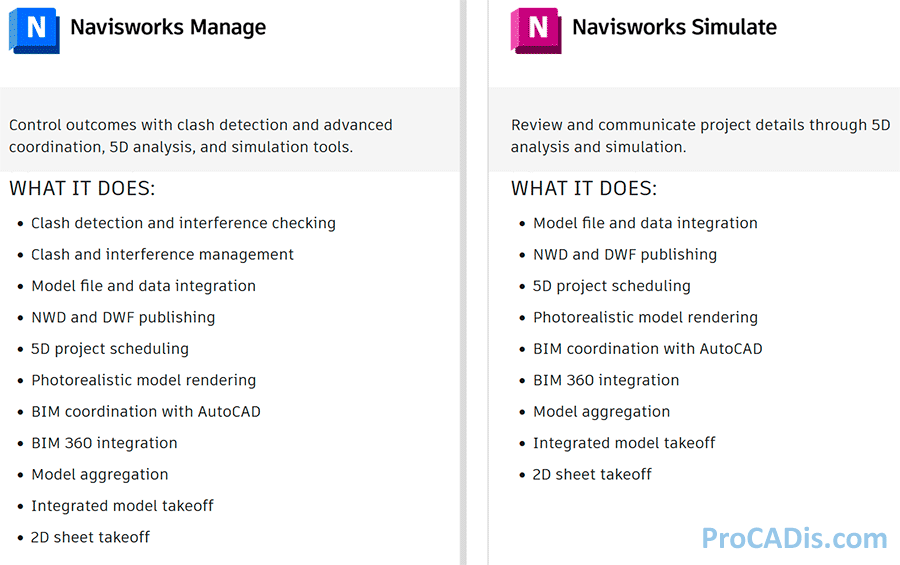
Compare Navisworks Manage vs. Simulate to see which one is right for you.
Order Autodesk Navisworks Simulate 2022 from ProCADIs Store at a discount and make sure it is the most efficient solution for your business. Increase your productivity using only 100% working software, which you can always buy from our store at the lowest prices!
BIM 360 Model Coordination integration
Quickly identify and resolve costly constructability issues.
Updated IFC file reader
Use the same open source code from Revit to handle IFC files, with added hierarchy, Pset, and data enhancements.
Detect clashes and coordinate models
View clashes in context to help find and resolve conflicts. Only available in Navisworks Manage.
Supports 60+ file formats
Open and work with a variety of CAD file formats in one comprehensive application.
BIM coordination with Autodesk products
Open Navisworks files within AutoCAD, Revit, and ReCap.
Navisworks + Point Layout
Automatically add layout points to coordinated models and import, export, and compare directly in Navisworks.
Aggregate data into a single model
Combine design and construction data into a singular model.
Model simulation and animation
Link animated model objects to your construction schedules for high-quality project simulations.
Whole-team project review
Bring together data created by multidisciplinary teams to explore and review complex models in real time.
Integrated quantification takeoff
Measure lines, areas, and counts with 2D and 3D takeoff rather than carrying out manual calculations.
Quantification from PDF sheets
Trace existing geometry on a 2D PDF worksheet, such as a floorplan, to create takeoffs automatically.
Navisworks + Assemble
Bring models from Navisworks into Assemble for use in estimating, scheduling, or other workflows.
Systemanforderungen · Windows
| Betriebssystem | 64-bit Microsoft® Windows® 10. |
|---|---|
| Prozessor | Basic: 2.5–2.9 GHz processor Recommended: 3+ GHz processor |
| Arbeitsspeicher | Basic: 8 GB Recommended: 16 GB |
| Bildschirmauflösung | Herkömmliche Bildschirme: 1920 x 1080 mit True Color Hochauflösende und 4K-Bildschirme: Resolutions up to 3840 x 2160 supported on Windows 10 (with capable display card) |
| Grafikkarte | Basic: 1 GB GPU with 29 GB/s Bandwidth and DirectX 11 compliant Recommended: 4 GB GPU with 106 GB/s Bandwidth and DirectX 12 compliant |
| Speicherplatz | 10.0 GB |
| Zeigegerät | MS-Mouse-kompatibel |
| .NET Framework | .NET Framework version 4.8 or later |
1 month · €79.95 · Change


